Vitok App India – Download, Register & Get Started
New to Vitok?
This guide explains how to get the Vitok App, choose whether to join as a host or an agency, complete the right registration process and understand what happens after you register.
How to Get Started with Vitok
- Get the Vitok App
- Choose Host or Agency
- Complete Registration
- Complete Approval
- Review Current Policy
- Start After Approval
What is the Vitok App?
Vitok is an interactive app with features such as video calls, user interaction and virtual gifts.
Eligible people can join as hosts (also called streamers), who take part directly, or through the agency program, where agency partners recruit and support a team of hosts.
VitokAgency.com is an independent recruitment and guidance site. It doesn't own or operate the Vitok App; it helps people in India get the app and register. For an overview of both paths, see Vitok Agency India.
How to Download the Vitok App
This site provides the Vitok App as an Android APK. There's no Google Play or App Store link on this site, and an iOS version isn't offered here.
- Tap the download button and save the file.
- It's a large file (over 100 MB), so Wi-Fi is best.
- Open the downloaded file to install it. Android may ask you to confirm installing an app from outside the Play Store; confirm only for this file.
- Open the app and follow the registration steps below.
Android APK provided through VitokAgency.com.
Download Vitok from a Verified Source
Use the download link on this page. Copies of the app shared in groups, forwarded messages or unfamiliar websites may be outdated or modified.
Avoid:
- APK files forwarded by strangers
- "Modded" or "unlocked" versions
- Turning off your phone's security protections
- Paying anyone for a download link
Choose How You Want to Join Vitok
Join as a Vitok Host
- For
- People who want to take part directly as hosts or streamers.
- In the app
- Login as Streamer
- What's involved
- Host registration, approval, eligible host activities, and earnings under the current policy.
Create a Vitok Agency
- For
- People who want to recruit and support a team of eligible hosts.
- In the app
- Become an Agent
- What's involved
- Agency registration, approval, host recruitment, and applicable agency commission.
How to Join Vitok as a Host
- Open the app and choose Login as Streamer.
- Enter your mobile number and verify it with the OTP.
- Complete your host profile: name, photo and requested details.
- Wait for your profile to be reviewed and approved.
- Review the current host policy.
- Start after approval.
Full walkthrough: Vitok Host Registration.
How to Join Vitok as an Agency
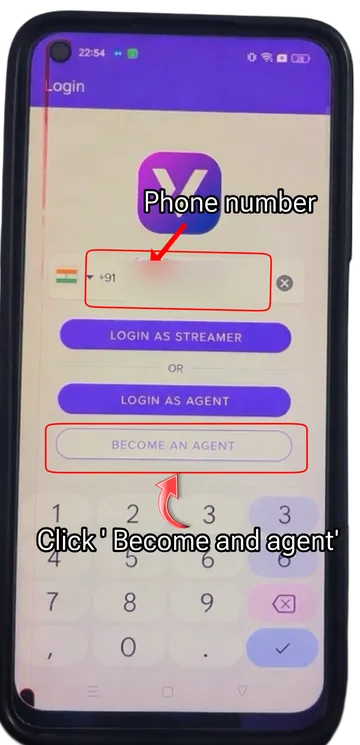
- Open the app, enter your mobile number and tap Become an Agent.
- Complete the required agency details.
- Create your agency account, including OTP verification.
- Follow any verification instructions.
- Wait for agency approval.
- Start recruiting eligible hosts after approval.
Full walkthrough: Vitok Agency Registration.
Vitok App Guide
After you enter your mobile number, the login screen shows three options. Picking the right one is the most important choice in registration:
Prefer video? The host registration tutorial walks through sign-up in the app.
What to Do After Vitok Registration
Registering isn't the same as being approved. This is the process our team guides people through.
- Register
- Save Your Details
- Profile Reviewed
- Follow Instructions
- Approval
- Start
Save your details: keep a note of the mobile number you registered with, and agencies should also save their Agency ID. If you're unsure what happens next, message our team on WhatsApp. Agencies can share their Agency ID so we can help check.
Vitok Host Approval
Completing registration doesn't necessarily mean your host account is approved straight away.
After you complete your host profile, it's reviewed before approval. Follow any verification or approval instructions in the app. Approval time can vary.
Vitok Agency Approval
Agency registration and agency approval are separate steps.
After registering, your agency profile is reviewed. Follow any verification instructions and wait for approval before recruiting hosts. If you're unsure of the status, send us your Agency ID on WhatsApp.
Setting Up Your Vitok Account
- Enter accurate information
- Save your registration details or Agency ID
- Follow the current verification instructions
- Keep your account access secure
- Review the current policy before starting
- Contact support if the next step is unclear
Keep Your Vitok Account Secure
Our team will never ask for your OTP or password.
- Never share your password
- Never share an OTP, with anyone
- Don't use registration links from strangers
- Don't install APKs from unknown sources
- Only trust the support contacts on this website
- Don't pay anyone promising guaranteed earnings
How Vitok Hosts Can Earn
Eligible hosts may earn beans through video calls, virtual gifts, applicable bonuses and performance or ranking rewards. Earnings vary and aren't a fixed salary.
How Vitok Agencies Can Earn
Eligible agency partners may receive commission based on applicable host activity and the current agency policy. Registering an agency doesn't guarantee commission.
Check the Latest Vitok Policy
Before relying on a call rate, bonus, commission percentage, withdrawal condition or performance requirement, check the applicable policy date.
Common Vitok Registration Problems
The download isn't working
The file is over 100 MB. Check your connection and free storage, try again on Wi-Fi, or message us for help.
The app won't install
Make sure you're using an Android phone and opening the file you downloaded from this page. Don't try other sources; message us instead.
I'm not sure which role to choose
Hosts choose "Login as Streamer". New agencies choose "Become an Agent". See Host or Agency above.
The OTP didn't arrive
Check the mobile number you entered and your signal, then wait a little before requesting a new OTP.
Host registration done, approval pending
Approval time can vary. Check the app for any instructions, then contact us on WhatsApp if you're unsure of the next step.
Agency registered, next step unclear
Save your Agency ID and send it to us on WhatsApp so we can help you check your approval.
I can't find my registration ID
Check your account or profile section in the app. If you still can't find it, message us with the mobile number you registered with. Never send your OTP or password.
The registration page won't open
Registration happens inside the app, not on a website. Make sure the app is installed and opens, then follow the steps above.
Vitok App & Registration Frequently Asked Questions
What is the Vitok App?
Vitok is an interactive app with features such as video calls, user interaction and virtual gifts. People can join as hosts (streamers) or take part through the agency program.
How can I download the Vitok App?
This site provides the Vitok App as an Android APK download. Use the download button on this page, then open the downloaded file to install it. An iOS version isn't offered through this site.
Is Vitok available in India?
This website helps people in India join Vitok, and registration is done inside the Vitok App. If you have trouble getting the app, contact our team on WhatsApp.
How do I register on Vitok?
Install the Vitok App, enter your mobile number and choose Login as Streamer to join as a host or Become an Agent to create an agency. Then verify the OTP, complete your profile and wait for approval. Enter referral code REPPV8 if the app asks for one.
How do I join Vitok as a host?
Choose Login as Streamer in the app, verify your number with the OTP and complete your host profile. Your profile is then reviewed for approval. Our Vitok Host Registration guide covers each step.
How do I create a Vitok Agency?
Tap Become an Agent in the app, verify your number and complete your agency details. Your agency profile is then reviewed for approval. Our Vitok Agency Registration guide covers each step.
What should I do after host registration?
Wait for your host profile to be reviewed and follow any instructions in the app. Review the current host policy before you start. If you're unsure of the next step, contact our team on WhatsApp.
What should I do after agency registration?
Keep a note of your Agency ID and registered mobile number, wait for your agency profile to be reviewed and follow any approval instructions. You can send your Agency ID to our team on WhatsApp if you need help checking the next step.
How does Vitok Host approval work?
After you complete your host profile, it is reviewed before approval. Approval time can vary. Contact our team on WhatsApp if you need help with the next step.
How does Vitok Agency approval work?
Agency registration and approval are separate steps. Your agency profile is reviewed after registration, and you should only start recruiting hosts after approval. Approval time can vary.
Where can I check Vitok Host earnings?
Published call rates, beans conversion, daily bonuses and an earnings calculator are in our Vitok Host Earnings guide.
Where can I check the latest Vitok policy?
Our Vitok Policy page summarises the host and agency policy information published on this site. No official policy date is confirmed, so confirm important figures with our team.
How can I get help with Vitok registration?
Contact our support team on WhatsApp at +91 97741 67253 for help with the app, registration or approval.
Ready to Get Started with Vitok?
Pick the option that fits you.
Important Information
Registration requirements, app availability, earning rates, bonuses, agency commission and other platform conditions may change. Check the latest applicable information before relying on specific terms.
VitokAgency.com provides recruitment, registration guidance and informational content related to Vitok host and agency opportunities. It is not the official Vitok website. For an overview of both paths, see Vitok Agency India.